WhatsApp QR code generator - create a dynamic QR code

There are two major types of QR code. Static and Dynamic.
Static vs. dynamic WhatsApp QR code
There are two major types of QR code. Static and Dynamic.
The difference between the two is that a dynamic code allows for future editing and usually comes with additional features such as tracking, analytics, and custom branding, whereas a static QR code is fixed from the moment it's published, and provides no usage information or editing capability.
For personal use, it’s fine to use a static QR code that you can easily create on WhatsApp itself.
For businesses it's advisable to go with a premium service that includes more. Here's a detailed comparison:
| Feature | Static WhatsApp QR Codes | Dynamic QR Codes |
| Tracking Capabilities | None | Comprehensive scan analytics |
| URL Modification | Not possible | It can be updated anytime |
| Customization | Limited color schemes | Full design control |
| Scan Analytics | None | Time, location, device type |
| Brand Integration | Limited | Custom logos and colors |
| Use Case | Personal sharing and one-time use | Business, marketing, and more |
How to create a WhatsApp QR code for your business
Now, before we get started, it's worth pointing out that WhatsApp itself has a QR code feature, which will be good enough for individuals. If you're running a business, however, you'll want some more control over your QR code. Things such as custom branding, analytics, and editing later, all require a third party dynamic QR code generator tool such as QR Code Developer.
Step 1: Generate your short link
Go to WhatsApp and open your business profile settings, then tap Short Link.

From here you can create a custom default message for users to send when they first scan the code.
Step 2: Create your QR code
Go to our QR code generator tool.
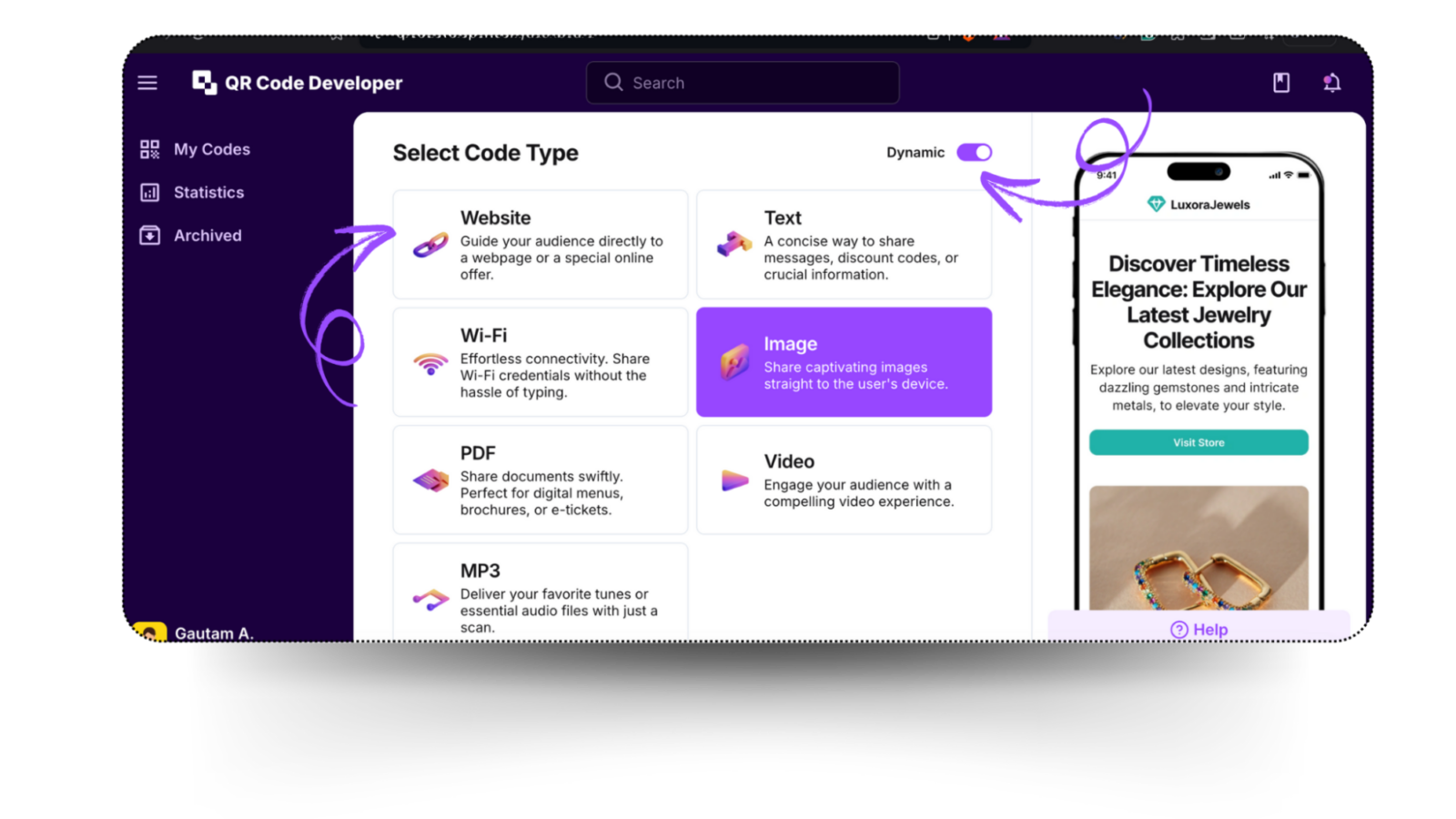
Select Website as the code type. Using this type for your WhatsApp QR code allows you to input the short link so people's phone will automatically open WhatsApp. Make sure you select Dynamic so you can edit later, for example if you want to change your automatic message in WhatsApp.
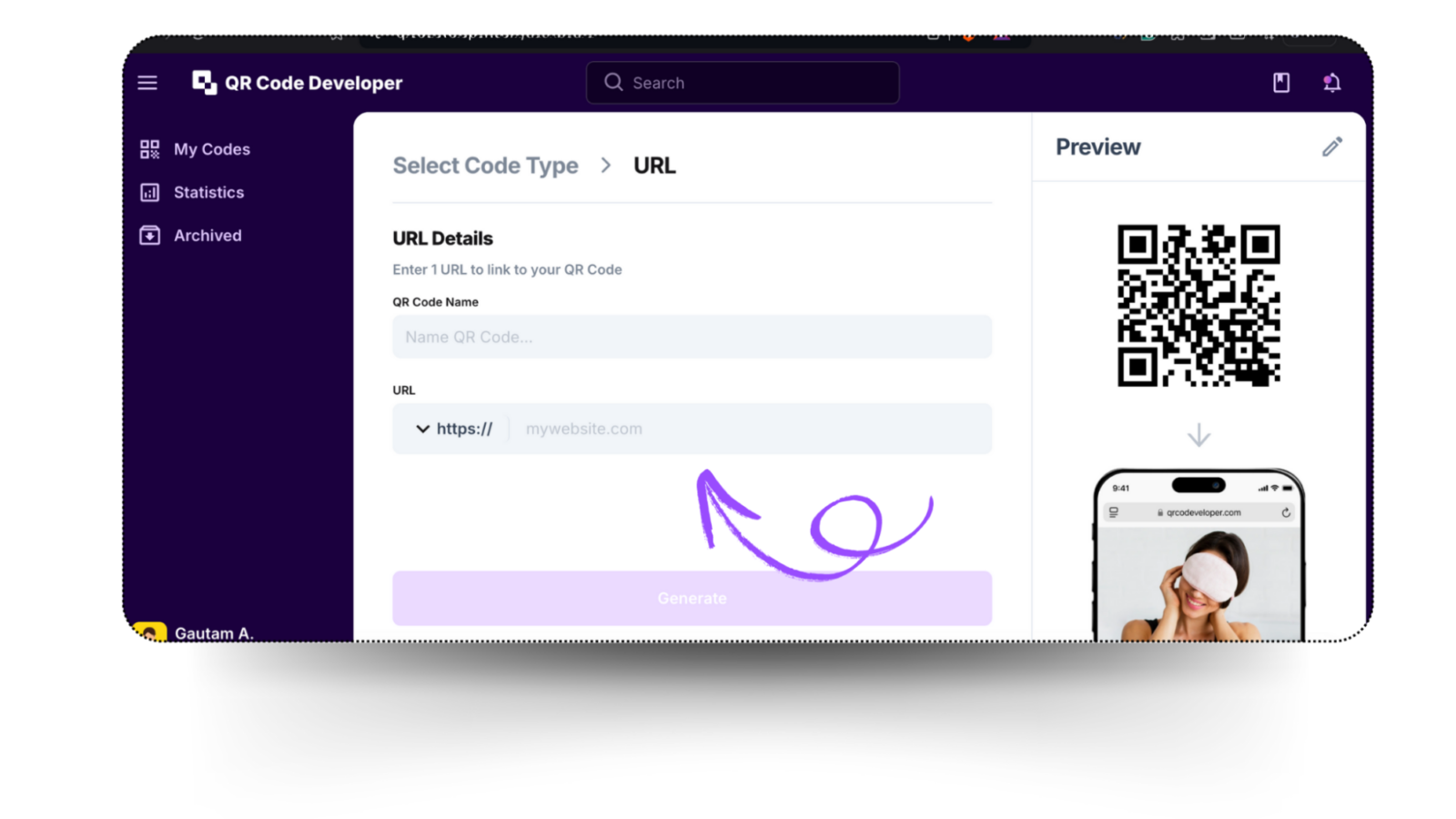
Input your short link in the URL area and give your WhatsApp QR code a name.
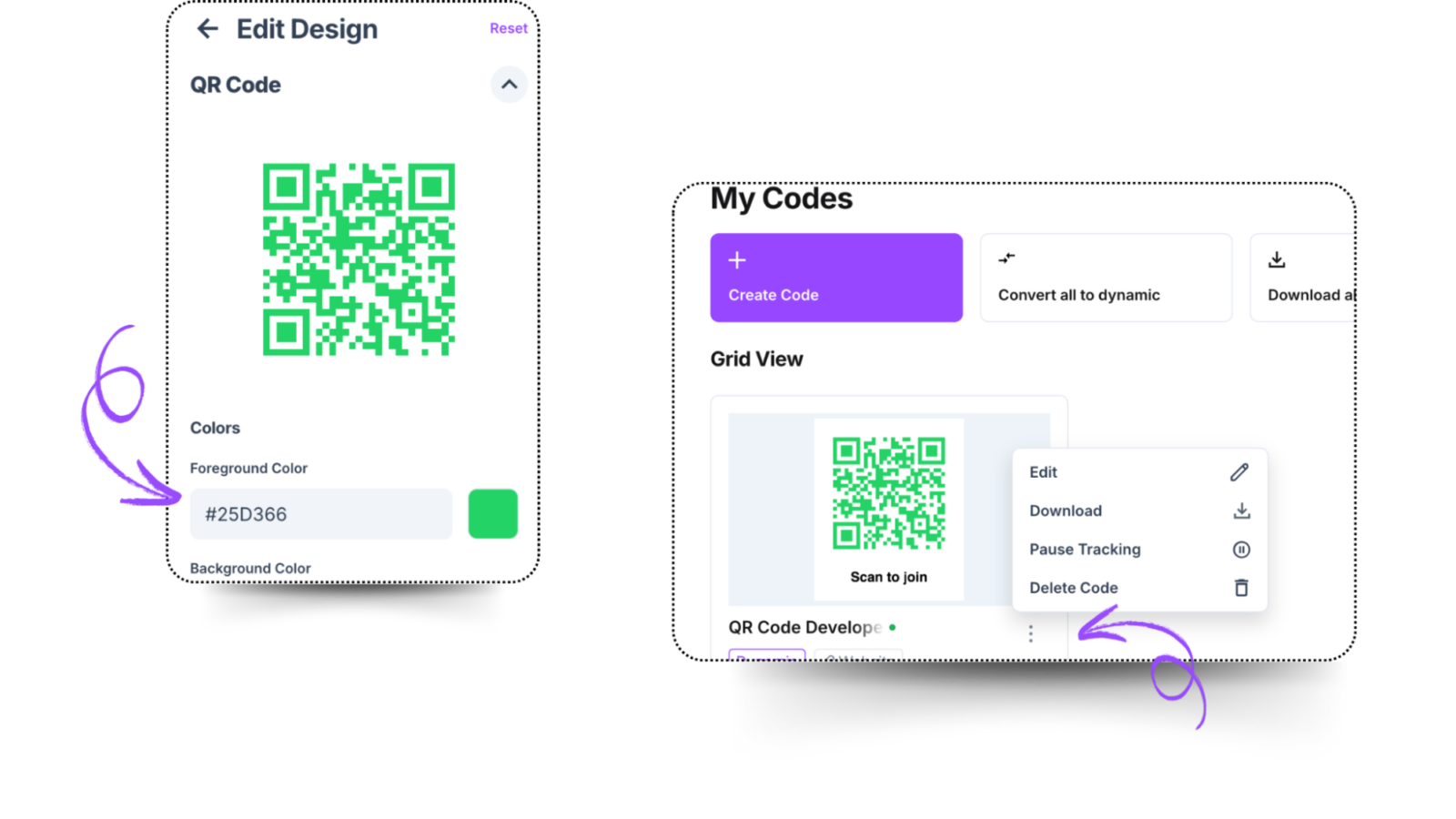
Now it's time to customize your QR Code's design. Go for something with a good amount of contrast to help any printed QR codes last longer, and choose something that matches your brand style.
Step 3: Distribute your WhatsApp QR code
After you've completed the design of your QR code, you can download the image file and upload it to your website/ socials, as well as use on printed materials - see our guides on how to add QR codes to flyers, stickers, or business cards.
Marketing & business uses
WhatsApp QR codes shine when bridging offline and online engagement. Marketers can use them to integrate WhatsApp into nearly any campaign or customer journey. For example, a restaurant might place a QR code on a menu or table tent that launches a WhatsApp chat for reservations or loyalty signups. A retailer can put a code on receipts or product packaging to enrol buyers in a loyalty program or send special offers. On event flyers or banners, scanning a WhatsApp QR code can instantly let attendees join a support chat or RSVP via WhatsApp.
Offline to online campaigns: Place QR codes in physical media (flyers, posters, packaging, billboards, vehicle wraps) to drive traffic into WhatsApp chats or your sales funnel. A QR code on a print ad can send people directly to customer support or a product demo chat, seamlessly connecting print/digital marketing with real-time engagement. This is ideal for campaigns that span channels (print, social, outdoor) and want measurable engagement.
Loyalty programs & promotions: Use QR codes to sign customers up for rewards. For instance, a café could print a QR code on receipts that customers scan to join a WhatsApp loyalty club or to claim a coupon. This encourages repeat business and captures customer consent. QR codes can link to WhatsApp chatbots that collect phone numbers and grant points or discounts. Brands often use QR codes to deliver exclusive content or coupons.
WhatsApp business / API integration: Companies using the WhatsApp Business API can integrate QR codes into broader systems. For example, scanning a code could trigger a conversation flow with an automated bot (for FAQs or lead capture) or route the user to the appropriate sales representative. You can combine QR codes with chatbots to automate customer support and capture leads on the spot. Many CRM or marketing platforms support generating WhatsApp-enabled QR codes that tie directly into messaging sequences or chatbots.
Lead generation at events: Trade shows and conferences benefit greatly from QR codes. Display a WhatsApp QR code at your booth. visitors can scan to quickly exchange contact info or enter contests, which immediately starts a conversation. According to a user testimonial, introducing trackable QR codes in events “increased our leads by 10x” by simplifying data capture and follow-up. Because dynamic QR codes support tracking, you can see exactly how many booth visitors engaged via the code.
Community building (WhatsApp groups): For customer communities or internal teams, create a WhatsApp group invite QR code. Attendees can scan the code to join a group chat without typing a link. This is especially useful for events or loyalty clubs: display the group QR on signage or digital channels so interested users can join instantly. (Admin can later revoke the group invite link if needed.)
Customer support & networking: A QR code on your website or business card can instantly open a chat with support or sales. For small businesses, this provides a frictionless “chat now” button in print form. Agents can also share personal WhatsApp QR codes to connect with new leads. It’s like a digital handshake: customers scan to text you immediately.
Each use case leverages the immediacy and popularity of WhatsApp (2+ billion users worldwide). By making it easy for customers to start a conversation, QR codes help businesses generate leads, deliver promotions, and provide support more effectively.
Best practices for WhatsApp QR code implementation
Designing tips
- Use colors that align with your branding.
- Ensure that there is a high contrast between the code and the background.
- Choose colors that complement each other.
- Always prefer one darker with one lighter shade.
- Include an engaging and hooking call-to-action text, such as “Scan to learn more!”
Security tips
Generate QR codes from trusted platforms like QR Codeveloper to prevent security risks.
Regularly monitor analytics to detect and address suspicious activities.
Common mistakes and troubleshooting WhatsApp QR codes
Even the most tech savvy users can experience issues along the way. Here are solutions to the most common problems we see users experiencing:
QR code won't scan
This is often because of poor contrast or design issues. If the QR code doesn't have high enough contrast, some devices won't be able to scan it. You can customize your QR code colors, but be sure to chose contrasting foreground and background colors.
Distorted or damaged code
Printed QR codes can become degraded over time along with material they're printed on. Avoid printing QR codes on uneven surfaces, and avoid laminating paper printouts as the plastic reflects light and makes it more difficult to scan.
Broken links
If the the short link from whatsApp changes then your QR code will stop working. If you are using a static code then you'll need to start from scratch with an entirely new QR code and redo any printouts etc. If you opt for a dynamic QR code then you'll be able to log in and update the link associated with the QR code and it will continue working as normal.
Users without WhatsApp
If someone without WhatsApp scans your coded, it will take them to a download page. Make sure you let people know that the code is for WhatsApp, so they are not caught unawares and become suspicious of an unknown application download.
Final thoughts
It is safe to say that integrating WhatsApp QR codes into your marketing strategy can help you reach customers quicker, with more convenience, and at a low cost. Whatsapp QR codes make sharing more convenient. For personal use, static QR codes offer a simple solution. However, businesses looking to boost engagement and gather customer insights should choose dynamic QR codes. Dynamic QR codes provide you with analytics that can help in many ways. With the proper implementation, WhatsApp QR codes can transform how you connect with your audience, making communication effortless and measurable.
Ready to create your QR code?
Generate custom QR codes in seconds - free and easy to use.
Create Free QR Code →