How much data can a QR code store?

QR codes are everywhere, from restaurant menus and mobile payments to event tickets and business cards. But have you ever wondered how much information a QR code can actually hold?
In this guide, we'll break down the maximum data capacity of QR codes, explain what affects that capacity, and offer best practices for making your codes efficient and scannable.
What is a QR code?
A QR code (short for Quick Response code) is a type of two dimensional barcode invented by Denso Wave in Japan in 1994. Unlike traditional barcodes, which store data horizontally, QR codes store data both vertically and horizontally, allowing for much higher information density.
How Much Data Can a QR Code Store?
The amount of information a QR code can hold depends on three main factors:
- Type of data
- QR code version
- Error correction level
Let’s break these down.
1. Data Type and Character Limits
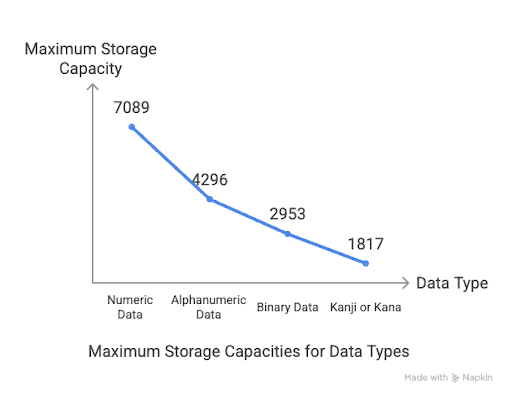
Different types of content take up different amounts of space. Here’s a breakdown of the maximum storage capacity based on the data type:
| Data Type | Max Capacity (Version 40, Low Error Correction) |
| Numeric (0–9) | 7,089 characters |
| Alphanumeric (0–9, A–Z, space, $%*+-./:) | 4,296 characters |
| Binary (8-bit bytes) | 2,953 bytes |
| Kanji/Kana | 1,817 characters |
Note: These are maximum limits under optimal conditions (Version 40, Level L error correction). Real-world limits are usually lower.
2. QR Code Versions (Size and Module Count)
There are 40 versions of QR codes, each increasing in size and data capacity:
- Version 1: 21×21 modules (smallest)
- Version 40: 177×177 modules (largest)
Each version adds rows and columns (modules), allowing more data to be stored.
3. Error Correction Level
QR codes include error correction to remain scannable even if part of the code is damaged. There are four levels:

| Level | % of Code That Can Be Restored | Use Case |
| L | 7% | High capacity, clean environments |
| M | 15% | Standard use |
| Q | 25% | Marketing or signage |
| H | 30% | Harsh conditions, logos embedded |
Higher error correction = less space for actual data
What Can You Store in a QR Code?

Here are the most common types of content stored in QR codes:
Plain Text
Short messages, trivia, or product codes.
URLs
Direct users to websites or landing pages. Use short URLs to avoid bulky codes.
Contact Info (vCard)
Add names, phone numbers, emails, and addresses, ideal for digital business cards.
Wi-Fi Login Details
Connect to Wi-Fi networks without typing passwords.
Event Info (iCal or Google Calendar)
Add events to calendars with one scan, useful for concerts, meetings, or conferences.
Prefilled Emails or SMS
Send templated messages or contact support with one scan.
Payment Details
Used for apps like PayPal, Google Pay, or bank transfers.
Small Files or Images (Not Recommended)
QR codes can technically store binary data, but the limits are tiny. It’s better to store a link to the file or image online.
Can a QR Code Store a Movie?
No QR codes cannot directly store a movie. A movie file is typically hundreds of megabytes or gigabytes, while a QR code can hold just a few kilobytes at most. Instead. store a link to a YouTube video, cloud storage, or streaming page.
Practical Drawbacks of Storing Too Much Data
While QR codes can store thousands of characters, stuffing too much data into one leads to problems:
- Harder to scan
- Requires higher resolution printing
- Takes longer for devices to read
- Visually cluttered
Best Practices for Creating Efficient QR Codes
Follow these tips to maximize QR code usability and performance:
- Keep data minimal, short URLs or text only
- Use the right error correction level based on context
- Test on multiple devices before going live
- Ensure high contrast between code and background
- Don’t print too small, size affects scan-ability
- Avoid placing QR codes on curved or textured surfaces
Conclusion
A QR code can store a surprising amount of data — from numbers and text to Wi-Fi credentials and payment details. However, the more compact and optimized your code is, the better the user experience will be.
Want to create your own QR code for any type of content? Try QR Code developer to generate custom QR codes in seconds for links, events, contact info, and more.
Ready to create your QR code?
Join thousands of businesses using QR codes.
Create Free QR Code →